
trading-tools-resources | 04-09-25
NinjaTrader vs. Tradovate: 2026 Quick Answer
While both are owned by the same parent company, the choice is now about Interface vs. Infrastructure. Tradovate is the best "plug-and-play" option for Mac/Web users who prioritize TradingView integration. NinjaTrader is the institutional powerhouse for those who need C# algorithmic automation and the most advanced Desktop SuperDOM, though its new Web and Mobile apps now offer 90% parity with Tradovate’s cloud features.
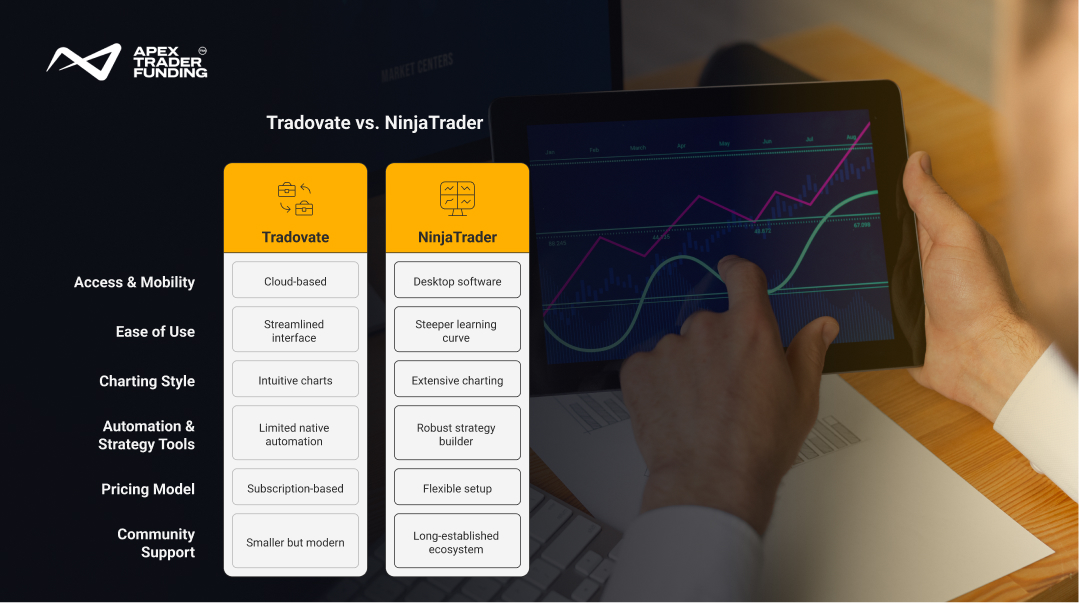
Side-by-Side Comparison: Tradovate vs NinjaTrader
While the details above break down each feature in depth, here’s a quick side-by-side comparison of Tradovate vs NinjaTrader to highlight the key differences at a glance.
Feature | Tradovate | NinjaTrader (2026 Update) |
Primary Edge | Cloud-native / TradingView Sync | Desktop Power / C# Automation |
Access & Mobility | Web, Mac, PC, iOS, Android | Native Windows + Web/Mobile Sync |
Charting Style | Modern / Pine Script Support | Institutional / NinjaScript Support |
Ease of Use | High (Beginner Friendly) | Medium (Steep Learning Curve) |
Automation | Basic (via TradingView) | Advanced (C# Strategy Builder) |
Pricing Model | Subscription / Commission-Free | License / Flexible Commissions |
Platform Design and User Experience
Tradovate was built with a modern, cloud-based framework. This means traders can access it on web browsers, desktops, or mobile devices without heavy installations. Its clean interface makes it beginner-friendly, while its speed and simplicity appeal to active day traders who value fast execution without unnecessary complexity.
NinjaTrader, in contrast, is a downloadable desktop application. Its layout feels more traditional, and while the learning curve is steeper, the depth of customization it offers is unmatched. Traders who want full control over chart setups, advanced indicators, and algorithmic testing often find NinjaTrader’s interface more powerful, even if it takes longer to master.
The 2026 Mac User Guide
Mac users face a distinct choice. Tradovate is the "Native" choice for Apple silicon, running seamlessly in Safari or Chrome without any extra setup.
NinjaTrader Desktop still requires a Windows environment (via Parallels or VMWare) for the full feature set. However, in 2026, the NinjaTrader Web platform has reached 90% parity with Tradovate, allowing Mac users to manage accounts, use the SuperDOM, and view advanced charts directly in their browser without virtualization.
Charting and Analytical Tools
Charting is where these platforms begin to diverge.
- Tradovate offers user-friendly charting that includes drag-and-drop order placement, built-in volume analysis, and flexible layouts. It’s designed for traders who want speed and usability over heavy customization.
- NinjaTrader offers one of the most comprehensive charting environments in the futures space. It supports advanced indicators, multi-timeframe analysis, strategy testing, and deep customization through third-party add-ons or coding. For traders who rely heavily on technical analysis, NinjaTrader becomes more of a development lab than just a trading screen.
The Automation Divide: Pine Script vs. NinjaScript
In 2026, the choice of platform often dictates your automation strategy.
- Tradovate (The Modern Path): Through its native TradingView integration, Tradovate allows you to execute strategies built in Pine Script. This is ideal for traders who prioritize "lightweight" automation, social signal integration, and cloud-based execution that doesn't require a dedicated server.
- NinjaTrader (The Power Path): The NinjaTrader Desktop utilizes NinjaScript (C#). This is the institutional gold standard, allowing for tick-by-tick backtesting, high-frequency execution, and complex "Automated Trade Management" (ATM) strategies that Tradovate’s web engine cannot match.
Order Execution and Speed
Execution speed is critical in futures trading.
- Tradovate’s cloud-based structure means orders are placed quickly across devices. Traders can monitor and manage positions seamlessly from a laptop at home or a mobile phone on the go. Its focus on simplicity + speed makes it a favorite for scalpers and intraday traders.
- NinjaTrader’s desktop model shines in precision order control. Features like ATM (Advanced Trade Management) strategies allow for automatic stop-loss and target placement, giving traders tighter control over risk. Although not as portable as Tradovate, NinjaTrader delivers the execution precision required for advanced strategies.
Costs and Pricing Models
- Tradovate uses a subscription-based model alongside commission-free trading options. Traders can choose between monthly or lifetime membership packages, making it cost-effective for high-frequency traders who want predictable expenses.
- NinjaTrader offers flexibility with per-trade commissions or license purchases. Traders can lease the platform monthly, buy a lifetime license, or use a free version with limited features. For active traders, purchasing a license often pays off over time.
Both models can be efficient, but your trading frequency largely determines which one is more cost-friendly.
Subscription fees and licenses matter less than whether the platform’s features truly serve your trading style.
Tools for Strategy Development
- Tradovate is streamlined for execution, with fewer native tools for backtesting or automation. Traders who prioritize manual execution and mobility will find its setup sufficient.
- NinjaTrader excels in strategy development and automation. It includes a built-in strategy builder, backtesting engine, and the ability to code custom indicators. For algorithmic traders or those refining complex playbooks, NinjaTrader offers more flexibility.
Community and Ecosystem
- Tradovate maintains an accessible community where traders share insights, tips, and strategies. Its ecosystem feels modern and connected, especially for those who appreciate cloud integration.
- NinjaTrader has a long-established community with forums, third-party developers, and plugin providers. This broader ecosystem gives traders access to a marketplace of custom indicators, automated strategies, and education materials, turning NinjaTrader into a hub rather than just a platform.
Which Platform Fits Which Trader?
- Tradovate is ideal if you prioritize fast execution, cloud-based access, mobile convenience, and straightforward subscription pricing. It’s ideal for active day traders and scalpers who want fast tools without unnecessary layers.
- Choose NinjaTrader if you prefer deep customization, advanced charting, backtesting, and automation. It’s best suited for traders who are comfortable with a desktop setup and want to build long-term strategies with precision.
The right trading platform isn’t about popularity—it’s about which tools feel natural in your hands.
Final Priority Action: The Unified Login Advantage
As of 2026, the technical wall between these two platforms has vanished. You no longer have to "choose" a side for your market data or your credentials.
- One Set of Credentials: You can log in to NinjaTrader Desktop using your Tradovate username and password, and vice versa. Your account balances, positions, and trade history sync in real-time across both environments.
- Data Portability: Market data subscriptions are tied to your Unified NinjaTrader ID. If you buy CME data on your phone via the Tradovate app, that same live data feed is instantly available when you sit down at your PC to use NinjaTrader Desktop.
- Strategic Flexibility: This allows you to use NinjaTrader for heavy lifting (C# automation and backtesting) while using Tradovate or TradingView for quick execution on your Mac or mobile device—all while paying for only one data feed.
Final Thoughts
When comparing Tradovate and NinjaTrader, the question isn’t competition but alignment with a trader’s style. Tradovate brings modern accessibility and speed, while NinjaTrader offers a powerhouse of customization and advanced strategy tools. Both belong in the toolkit of serious futures traders, but your choice depends on whether you prioritize mobility and simplicity or depth and development power.
FAQs
Yes, but it depends on how your account is set up. Tradovate and NinjaTrader are separate platforms, each with its own structure, pricing, and features. You can maintain both accounts if you want access to their different tools—for example, using Tradovate for its cloud-based mobility and NinjaTrader for its advanced charting and strategy testing. However, trades don’t automatically sync between the two, so you’ll need to manage each platform separately.
Tradovate offers different pricing options depending on how often you trade. The no-membership plan charges no monthly fee, with commissions set at $1.29 per side for standard contracts. The monthly subscription plan costs $99 per month and lowers the commission to $0.99 per side for standard contracts. Other costs such as exchange, clearing, and market data fees may also apply.
For traders considering funded accounts, it’s worth noting that Apex Trader Funding provides access to Tradovate as one of its supported platforms, making it possible to use Tradovate without taking on the direct platform costs yourself.
Yes, Tradovate does charge withdrawal fees depending on the method you choose. ACH withdrawals are typically free, but wire transfers carry a fee that varies by region and bank. Traders should check the current Tradovate fee schedule for exact costs, as international withdrawals may include additional charges from intermediary banks.
NinjaTrader has three main pricing options. With the free plan, there’s no monthly platform cost, but trade commissions are higher at about $1.29 per side for standard contracts and $0.39 for micros. At $99 per month, the subscription plan lowers commissions to roughly $0.99 per side for standard contracts and $0.29 for micros. For active traders, the lifetime license is a one-time payment of $1,499, which offers the lowest commissions, around $0.59 for standard contracts and $0.09 for micro contracts.
All plans include access to NinjaTrader’s desktop, web, and mobile platforms, as well as simulated trading and advanced tools. Additional costs may apply for live market data or third-party add-ons.
Related Blogs

trading-tools-resources | 28-08-25
How to Pass a Funded Trading Account? A Guide for 2026
Passing a funded trading account is often seen as the gateway to trading larger capital without risking personal savings. Yet many...
Read more
trading-tools-resources | 02-09-25
Apex Trader Funding vs Topstep - Detailed Comparison
Apex vs. Topstep: The 2026 VerdictThe choice between Apex and Topstep depends on your risk tolerance for drawdowns. Apex is cheaper...
Read more
trading-tools-resources | 15-09-25
What is the Prop Firm Consistency Rule?
Consistency is a word every trader hears, but in the world of proprietary trading firms, it has a very specific meaning....
Read more